v2.7 is live · Phone capture arrives July 1

Stop typing.
Start talking.

Automated Intake is your shop's AI receptionist — it listens to every check-in and phone call and captures every customer concern, note, and expectation, in full detail, straight into the repair order. Without ever touching the keyboard.

Talk. Tap. Done.

No credit card Zero contracts Works with Tekmetric
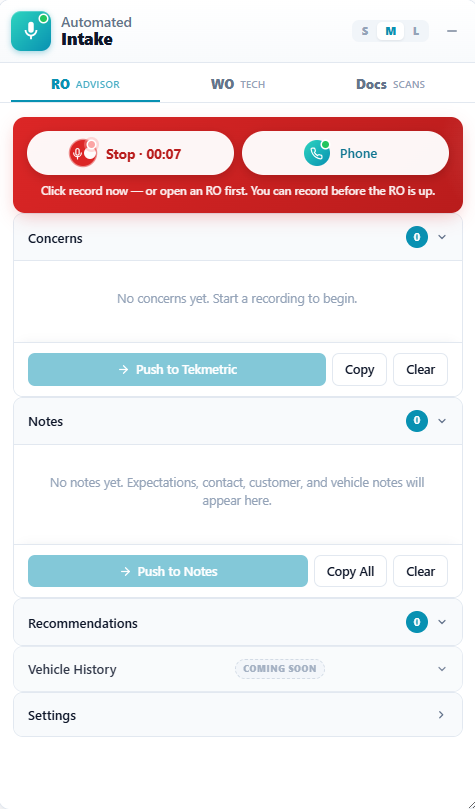
Automated Intake sidebar recording a customer check-in inside Tekmetric
Listening…capturing the concern
Pushed to RO3 concerns captured
A one-click add-on for the
software you already use.

No new system to learn. No switching programs. Automated Intake is a small add-on for the Google Chrome web browser that opens right inside your shop software — so your team keeps working exactly how they do today.

What’s a “browser add-on”?

It’s a small program that adds a feature to Google Chrome, like adding an app to your phone. You install it once, with a single click. That’s the entire setup.

It lives inside your shop software.

It shows up as an extra panel right inside the page you already use — Tekmetric. Nothing about how you work changes. It simply adds one more screen on the side.

One click, on any computer.

Open a repair order, click once, and start. It runs on any computer with Chrome — front counter, back office, anywhere your team works.

shop.tekmetric.com
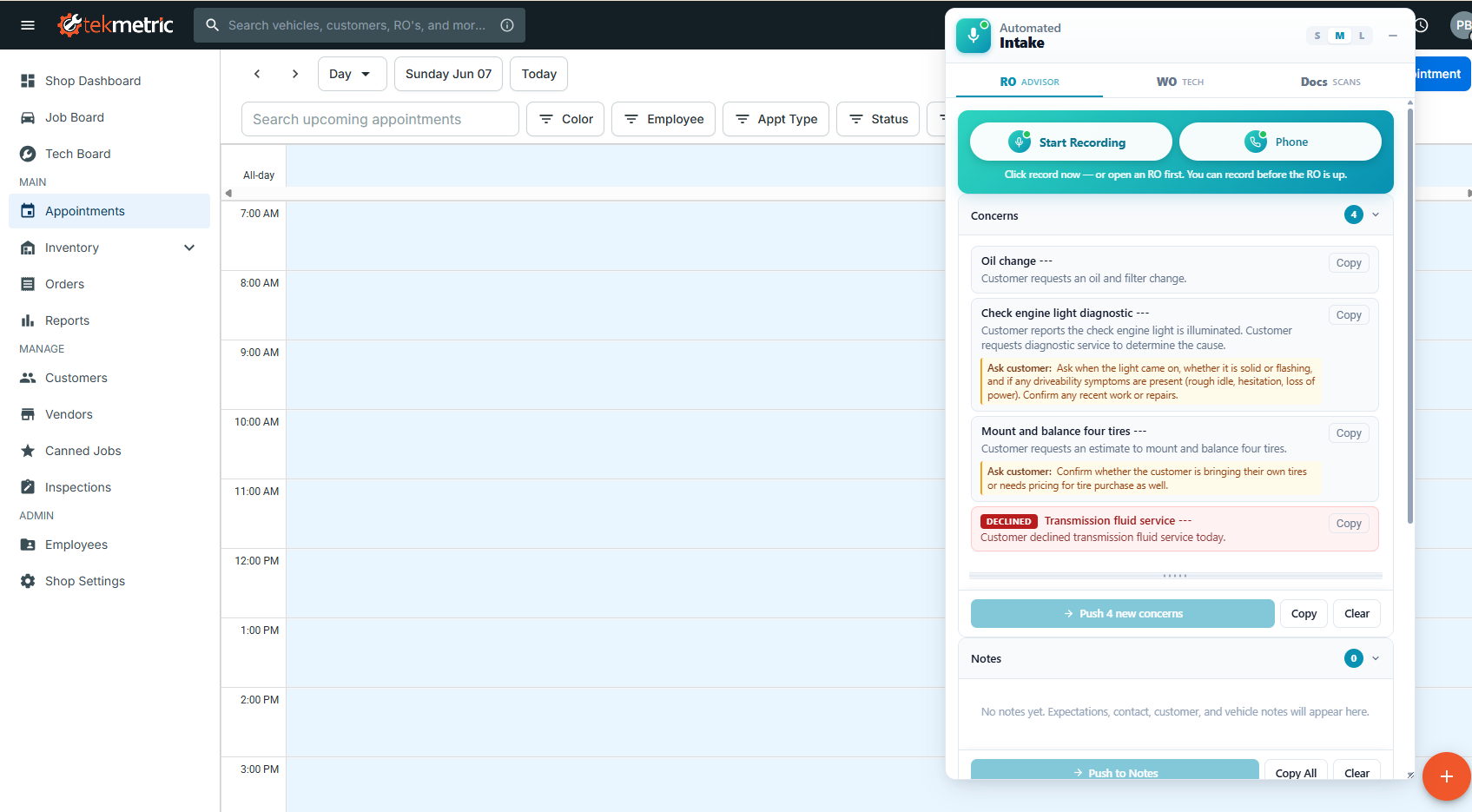
The Automated Intake panel docked inside Tekmetric on a repair order

The teal panel is Automated Intake — sitting right inside Tekmetric.

Take it for a spin

This is the real sidebar. Switch between the advisor and tech tabs, tap a mic — get a feel for it before you ever install.

RO · Advisor view

The customer just talks.

Your advisor taps record and has a normal conversation. No clipboard, no keyboard — eyes on the customer. Watch the concerns extract themselves.

Interactive click the tabs & the Speak mics
AutomatedIntake
2021GMC YukonDenaliEstimate SML
Start Recording Phone
Click record to capture this RO's concerns.
Concerns0
No concerns yet. Start a recording to begin.
Notes0
Tap Speak on a concern to dictate your finding
Front brake noiseEmpty
Cause
What did you find? Codes, readings, root cause…
Recommendations
Check engine lightEmpty
Cause
What did you find? Codes, readings, root cause…
Recommendations
Oil change + tire rotationDone
Cause
Full synthetic oil & filter change performed; rotated tires front-to-rear and reset the maintenance minder.
Forward scans & photos toshop-4821@upload.automatedintake.io
Vehicle Health Scan.pdf
Attached to RO · 2 min ago
Front brake pad — 3mm.jpg
Attached to RO · 5 min ago
Tire tread depth.jpg
Attached to RO · 11 min ago
Real-time AI prompting

Turn any advisor into your best advisor.

As the conversation happens, the system suggests the exact follow-up questions to ask — right under each concern, updating live. Your newest hire qualifies a customer with the same depth as a 20-year veteran, and nothing important slips by before the car hits the bay.

  • Live "Ask customer" prompts under every concern
  • Qualifies the customer during check-in or on the phone
  • Tracks declined services so they're never lost
  • Sorts notes into Expectations, Vehicle & Customer
Live the AI writes these as the customer talks
PushedBrake inspection request ---
Customer reports they want the brakes inspected because the vehicle seems to shake and makes a grinding sound.
Ask customer: Confirm whether the shaking is felt in the steering wheel or the brake pedal, and at what speed it's worst. Ask when the grinding started, whether it's constant or only when stopping, and if there's any pulsing in the pedal.
DeclinedDriver-rear tire slow leak ---
Driver-rear tire needs air about twice a week and the TPMS light comes on intermittently. Declined today — wants the budget on the brakes this visit, but asked us to note it for next time.

Prefer to watch?

A complete walkthrough of a real check-in, front counter to repair order.

Play the product demo

Crisp, self-hosted, no quality loss. Add your MP4 and it plays right here.

One extension. Three ways it captures.

However the information comes in — a face-to-face check-in, a live phone call, the tech's diagnosis in the bay, or a document from the lot — Automated Intake catches it and files it on the right repair order.

Live · Phone Jul 1
Start Recording Phone
Click record to capture this RO's concerns.
USE 01

Conversation & Phone Call Capture

Record the customer face-to-face at the counter — or capture the entire phone call through a small QuickTap kit on your shop line. Either way, every concern and expectation is transcribed and pushed into the RO.

In-person · livePhone calls · Jul 1Auto-push to Tekmetric
Live
Brake inspection Empty Speak
USE 02

Technician Voice Capture

In the bay, the tech taps a mic on any concern and narrates the finding out loud. Our AI writes a customer-ready diagnosis split into Cause, Recommendations, and Parts — no clipboard, no typing.

Per-concern micsCause + RecommendationsCopy-ready
Live
Forward to shop-4821@upload…
Vehicle Scan.pdf
Brake pad photo.jpg
USE 03

Document Upload

Forward a vehicle scan, inspection photo, or PDF from any phone to your shop's private upload address — it attaches to the matching repair order automatically, under the Docs tab.

Email it inAuto-attached to the RO

Your most detailed check-in,
captured word for word.

A real check-in is never three bullet points. It's a customer describing a noise, when it happens, what they've already tried, and what they're worried about. Automated Intake captures every word of it — at the counter or on the phone — and turns it into a clean, structured repair order. Nobody on your team types a thing.

Nothing gets lost

Every concern, symptom, and offhand detail the customer mentions is captured in their own words — including the parts that usually get forgotten between the counter and the bay.

The whole story, not three words

Your tech opens a work order with full context — what the customer said, how long it's happened, what sets it off — instead of "check noise." Better diagnoses, fewer walks back to the counter.

Trust that wins the next job

Customers see their exact words on the estimate. That transparency is what turns a one-time repair into a shop they keep coming back to — and tell their friends about.

The problems it actually solves

Automated Intake isn't a nice-to-have. It fixes the things quietly costing your shop time, money, and trust every single day.

Win back the time you lose typing

Advisors stop typing the check-in. That's minutes back on every car and hours back across the day. Time goes to customers and moving cars instead of a keyboard.

Never miss a critical detail

It never drops a price authorization, a promised time, or a specific situational request. Everything the customer says is captured and documented on the RO.

Close the advisor skill gap

Real-time prompts tell any advisor the exact qualification questions to ask. Your newest hire pulls the same depth of detail as your most experienced writer.

A seamless check-in & phone call

Advisors stay engaged in the conversation instead of staring at a screen, whether in person or on the phone. Every customer interaction feels calm, professional, and unhurried.

Faster, more accurate techs

The tech narrates a finding and it's rewritten into a clear, customer-ready story, with help being thorough on the recommendations. That means better diagnoses and fewer trips back to the counter.

Built for multi-advisor shops

Essential when more than one person touches an RO. No vehicle detail or customer request gets lost between advisors, because everyone opens the same complete story.

A paper trail of expectations

Every promise, expectation, and declined service is documented on the repair order. That protects your shop and gives the customer a record of exactly what was agreed.

One-click document uploads

Forward a scan or photo from your email or scan tool and it attaches to the right RO automatically. No logins, no fumbling, no lost paperwork.

Three steps. Under 60 seconds.

From customer conversation to structured repair order — without touching a keyboard.

Step 01

Record

Tap record in the panel inside Tekmetric and talk to your customer — exactly like you already do.

Step 02

Extract

AI transcribes the conversation and pulls out each concern, the vehicle details, and the symptoms — automatically.

Step 03

Push

Structured data drops into the repair order fields. Review, tweak if needed, move to the next car.

Live · Technician Mode

One sidebar.
Two workflows.

The advisor records the customer up front. The tech opens the same RO in the bay, flips to the WO tab, and every concern has a Speak mic of its own. Tap, narrate the finding, and our AI returns a customer-ready write-up split into Cause, Recommendations, and Parts/Add Labor.

  • Per-concern voice dictation rewritten as diagnostic prose
  • Color-coded cards: amber means "needs you," green means done
  • Private Notes that never reach the customer
  • Copy Finding produces a clean, customer-safe paste block
Explore Technician Mode → Read the release notes
v2.7
Automated Intake
2018
Ford Escape SE
ROADVISOR
WOTECH
Tech mode — tap Speak on any concern to dictate your finding. Our AI fills the fields.
Concerns 4
Oil changeDoneSpeak
Tire rotationDoneSpeak
Rattling noise diagnosisEmptySpeak
Verified Customer Concern
YESNO
Cause
What did you find? Codes, readings, root cause…
Recommendations
1. First action 2. Next action
Headlight replacementEmptySpeak

Works with your shop

Connects to the systems you already use. No migration, no disruption. Don't see yours? It still works standalone with clipboard export.

Tekmetric● Live
Shop-WareComing soon
Mitchell1Coming soon
AutoLeapComing soon
ShopMonkeyComing soon
ProtractorComing soon

Simple plans. Zero contracts.

Start free for 10 days — no credit card. Upgrade only when you're ready, right inside the extension.

Free Trial
$0 / 10 days
Full Conversation & Voice features. No card. No commitment.
  • Live conversation & voice capture
  • Technician Mode included
  • Up to 6 machines
Start Free
Phone Integration Jul 1
$299 /mo
Everything in Voice, plus live phone-call capture. + $99 setup per phone.
  • Everything in Voice
  • Live phone capture (QuickTap kit)
  • Up to 4 phones · 6 machines
Join waitlist
Zero contracts. Cancel anytime. · No card to start. · In-extension upgrades.

Stop typing. Start fixing.

Install the extension, sign in with your Tekmetric shop, and start recording. Ten days free, no credit card, zero contracts.